Step 1: Access the Event Contract Page
Log in to your TEBBIT account, click on [Trade] on the page, then select the [Event Contract] page.
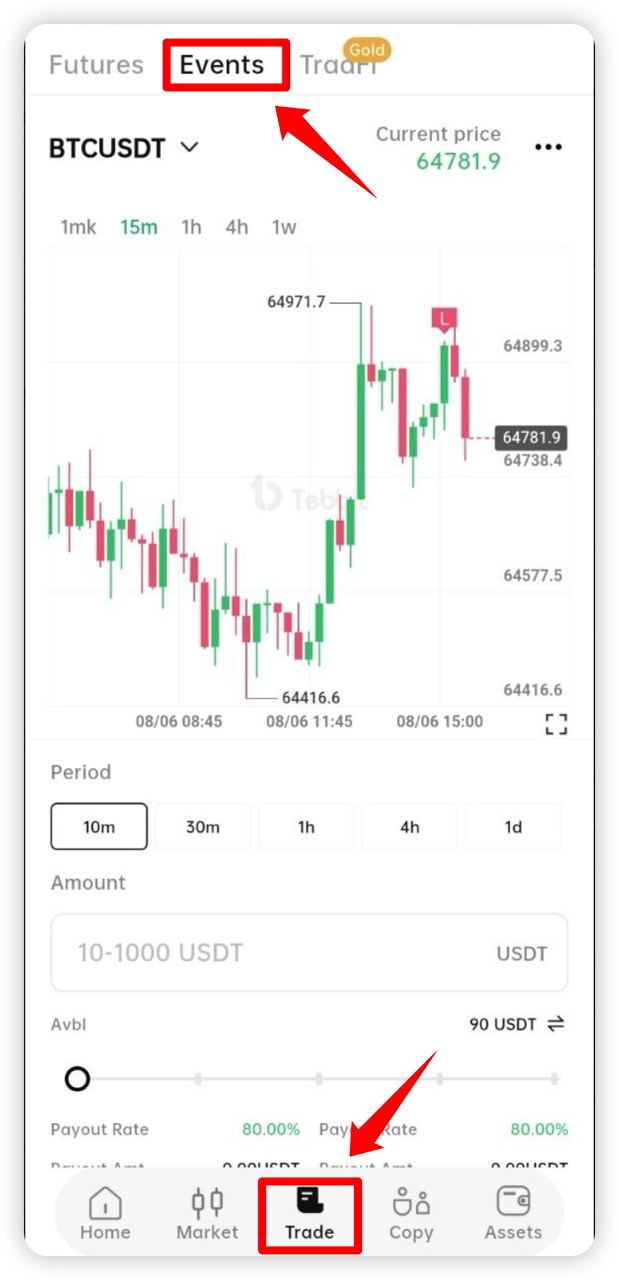
Please ensure your account has completed the platform’s required identity verification and security checks, and confirm that your spot account has sufficient USDT balance.
Step 2: Select the Underlying Asset
On the Event Contract page, choose the asset you want to trade.
Supported trading varieties on the platform may include:
· BTCUSDT;
· ETHUSDT;
The specific tradable assets are subject to what is actually displayed on the TEBBIT Event Contract page.
Step 3: Set the Contract Expiration Time
Select the contract period you want to participate in.
The platform may support the following expiration times:
· 10 minutes
· 30 minutes
· 1 hour
· 4 hours
· 1 day
The supported contract periods may vary depending on the trading asset; please refer to the actual display on the order page.
Once a contract order is submitted, it will be automatically settled according to the selected expiration time and generally cannot be terminated, revoked, or modified early.
Step 4: Enter the Trading Amount
Enter the trading amount for this event contract.
The minimum order amount is 10 USDT. The maximum trading amount and daily trading limits are subject to the platform’s actual display.
After entering the amount, the page will display:
· Contract amount;
· Payment ratio;
· Potential profit;
· Maximum possible loss;
· Estimated expiration time.
The contract amount paid when signing the event contract equals the user’s entered trading amount and is also the maximum possible loss for this order.
For example, if a user submits an event contract order of 10 USDT:
· If the prediction is correct, the user will receive profits according to the payment ratio displayed on the page;
· If the prediction is wrong, the user loses the 10 USDT contract amount for that order;
· The user does not need to pay additional margin or liquidation fees.
Step 5: Choose the Price Direction
Based on your judgment of the underlying asset’s price at expiration, select [Up] or [Down].
Select [Up]
If you believe the price index of the underlying asset will be higher at contract expiration than the opening price recorded when the order was confirmed, choose [Up].
Select [Down]
If you believe the price index of the underlying asset will be lower at contract expiration than the opening price recorded when the order was confirmed, choose [Down].
Users should carefully choose the trading direction based on market conditions, price trends, and their own judgment.
Step 6: Review and Confirm the Order
Before submitting the order, carefully check the following trading information:
· Trading asset;
· Up or down direction;
· Contract amount;
· Contract expiration time;
· Opening price;
· Payment ratio;
· Potential profit;
· Maximum possible loss.
After confirming all information is correct, click [Confirm] to submit the order.
Whether the order is successfully submitted depends on the order status displayed by the TEBBIT system.
Once the order is successfully submitted, it generally cannot be revoked, modified, transferred, or terminated early.
Note: If the order confirmation does not pop up, please click the icon at the top right of the Event Contract page, then select [... - Preferences - Enable order confirmation].
Step 7: Wait for Contract Expiration
After the order is successfully submitted, users only need to wait for the contract to expire.
During the contract validity period, users can view on the Event Contract page:
· Real-time price;
· K-line chart;
· Current order status;
· Opening price;
· Remaining time until expiration;
· Predicted direction;
· Potential profit.
After contract expiration, the system will automatically determine the result based on the underlying asset’s opening price and settlement price at expiration.
Step 8: View Settlement Results
After the contract expires, go to the [Closed Positions] or [Order History] page to check the settlement results.
1. Order details usually include:
Opening Price
The underlying asset index price recorded by the system when the order was successfully submitted.
Closing Price
The underlying asset index price used by the system for settlement at contract expiration.
Predicted Direction
The [Up] or [Down] choice selected by the user when submitting the order.
Payment Ratio
The fixed profit ratio displayed on the page when the user placed the order.
Profit or Loss Result
Shows the final profit earned or loss incurred from this order.
Trading Time
Records the order start time, expiration time, and settlement time.
2. How does the event contract determine profit or loss?
Select [Up]
If the settlement price at expiration is higher than the opening price, the prediction is correct, and the user receives profit according to the payment ratio displayed on the page.
If the settlement price at expiration is lower than the opening price, the prediction is incorrect, and the user loses the contract amount of this order.
Select [Down]
If the settlement price at expiration is lower than the opening price, the prediction is correct, and the user receives profit according to the payment ratio displayed on the page.
If the settlement price at expiration is higher than the opening price, the prediction is incorrect, and the user loses the contract amount of this order.
If the opening price equals the settlement price at expiration, the specific settlement method is subject to the TEBBIT Event Contract page and platform rules.
3. Trading Example
A user selects the BTCUSDT event contract with the following order details:
* Contract direction: Up;
* Contract period: 30 minutes;
* Contract amount: 10 USDT;
* Payment ratio: 80%;
* Opening price: as recorded by the system when the order is confirmed.
If, after 30 minutes, the BTCUSDT settlement price is higher than the opening price, the user’s prediction is correct and they receive the corresponding profit.
Potential profit calculation:
10 USDT × 80% = 8 USDT
The user’s settlement amount will be:
Contract amount 10 USDT + Profit 8 USDT = 18 USDT
If the settlement price at expiration is lower than the opening price, the user’s prediction is incorrect and they lose the 10 USDT contract amount paid for this order.
The actual payment ratio and settlement results are subject to what is displayed on the page when the user places the order.
4. Important Notes
1. Once an event contract order is confirmed, it generally cannot be revoked, modified, or terminated early.
2. Users should carefully confirm the trading asset, direction, amount, expiration time, and profit ratio before submitting an order.
3. The profit ratio of event contracts may be adjusted based on market conditions, trading assets, and contract periods.
4. Users must ensure sufficient USDT balance in their account; otherwise, the order may fail to submit successfully.
5. Different assets may support varying trading amounts, contract periods, and payment ratios.
6. In cases of extreme market conditions, abnormal price data, network failures, system maintenance, or third-party data source anomalies, the platform may delay settlement, suspend trading, or use backup price data.
7. All order data, price records, and settlement results are based on TEBBIT system records.
8. Users must not exploit system delays, price anomalies, technical loopholes, multiple accounts, or related accounts for illegal arbitrage.
5. Risk Warning
Event contracts are high-risk trading products, and market prices may experience sharp fluctuations within a short time.
Although the maximum loss per order is limited to the contract amount paid by the user, frequent trading or consecutive incorrect predictions may rapidly reduce account funds.
Users should participate cautiously based on their financial condition, trading experience, and risk tolerance. They must not use borrowed funds, essential living funds, or funds beyond their ability to bear for trading.
The price information, K-line charts, payment ratios, and product introductions provided by TEBBIT are for trading services only and do not constitute any investment advice, profit guarantees, or principal protection. Historical market data and past trading results do not represent future performance.